A spending tracker for iPhone · coming soonComing soon to iPhone

Your money
has a pulse.

Know when your spending is off, and see exactly why. No budget needed.

A volcano drawn in hundreds of thin contour lines, a river of lava running down its flank and out across the plain.

Scroll to see how it works

Sound familiar?

You never know if a week was normal.
Lava Money compares it with your own history, so you know in seconds.
You went over budget and don't know why.
Tap the category. The stores and charges behind it are right there.
Setting up a budget feels like homework.
Pick Tighter, Usual or Fits all. It's based on your last six months.
You can't find that one charge.
Search every charge, then fix it in a few taps.
A charge

Was that normal?

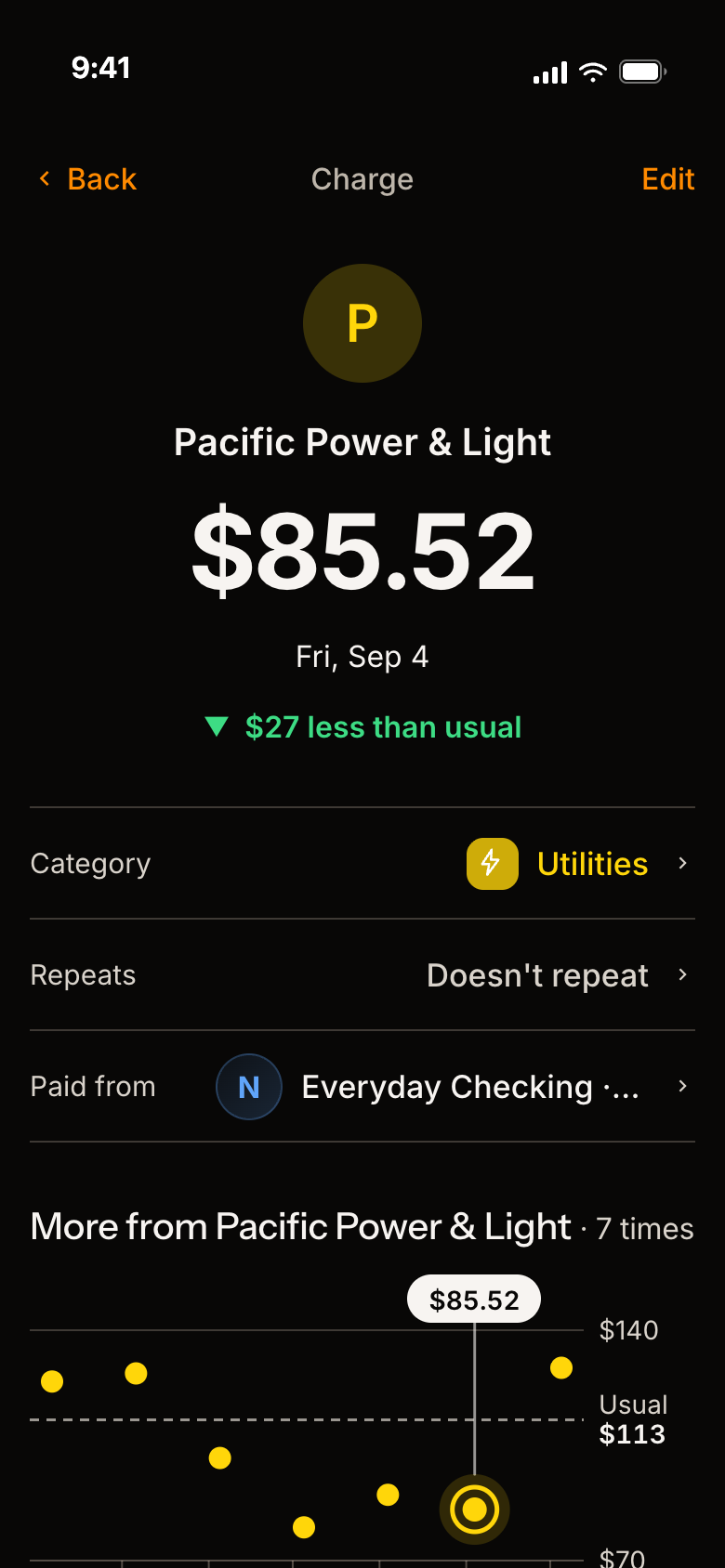
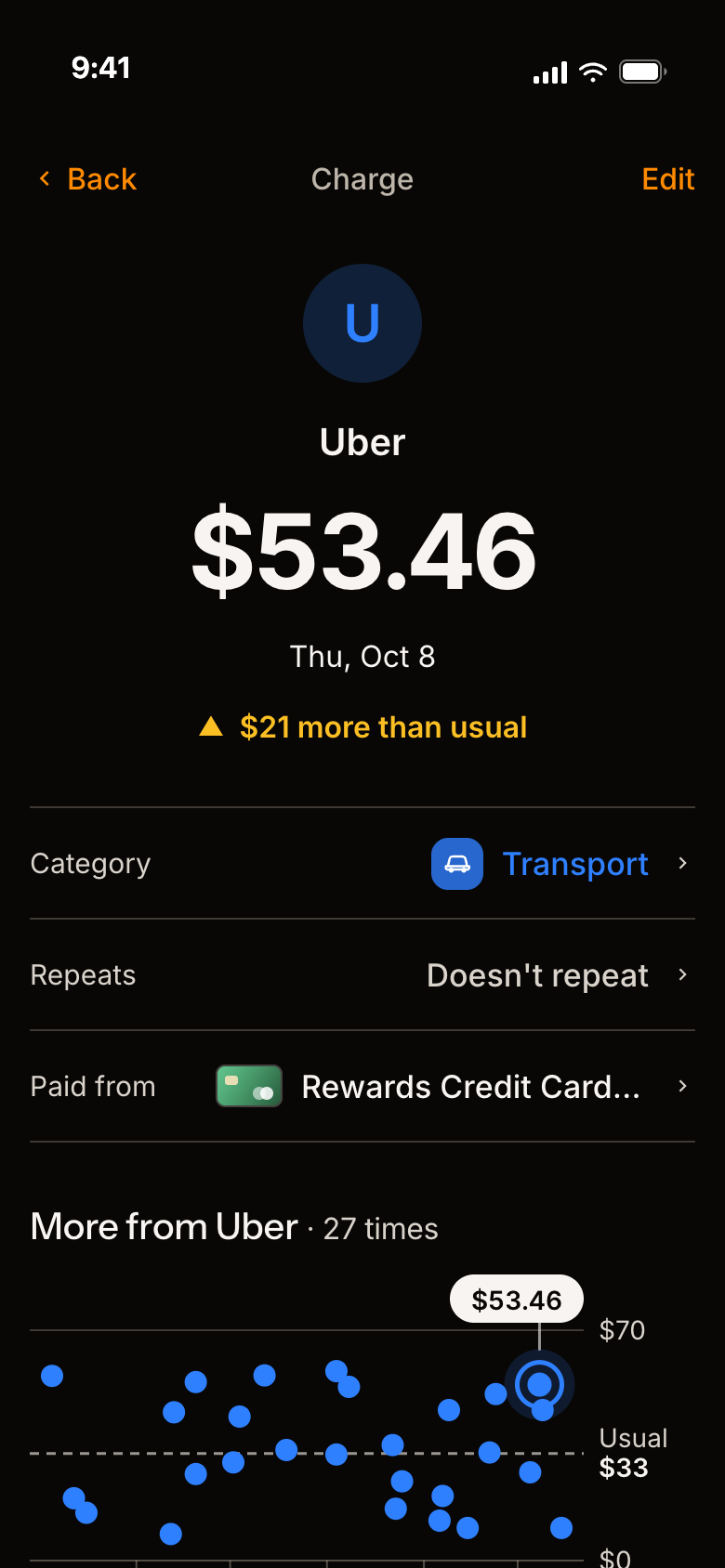
Tap any charge to see how it compares with your usual.

Pick a charge

  1. See right away if it was high or low for you.
  2. Each dot is a past visit. The dashed line is your usual.
  3. Tap Edit to fix the category, date or amount.
A charge page with sample numbers: Back and Edit buttons, the label Charge, a blue U for Uber, $53.46 on Thu, Oct 8, the line '$21 more than usual', rows for Category (Transport), Repeats and Paid from, and under them 'More from Uber, 27 times' with a dot for each visit, a dashed line for a usual of $33, and this charge marked at the right.
A charge page with sample numbers: Back and Edit buttons, the label Charge, a yellow P for Pacific Power & Light, $85.52 on Fri, Sep 4, the line '$27 less than usual', rows for Category (Utilities), Repeats and Paid from, and under them 'More from Pacific Power & Light, 7 times' with a dot for each visit, a dashed line for a usual of $113, and this charge marked.
Spending

Your spending, your way.

Day, week or month. You pick.

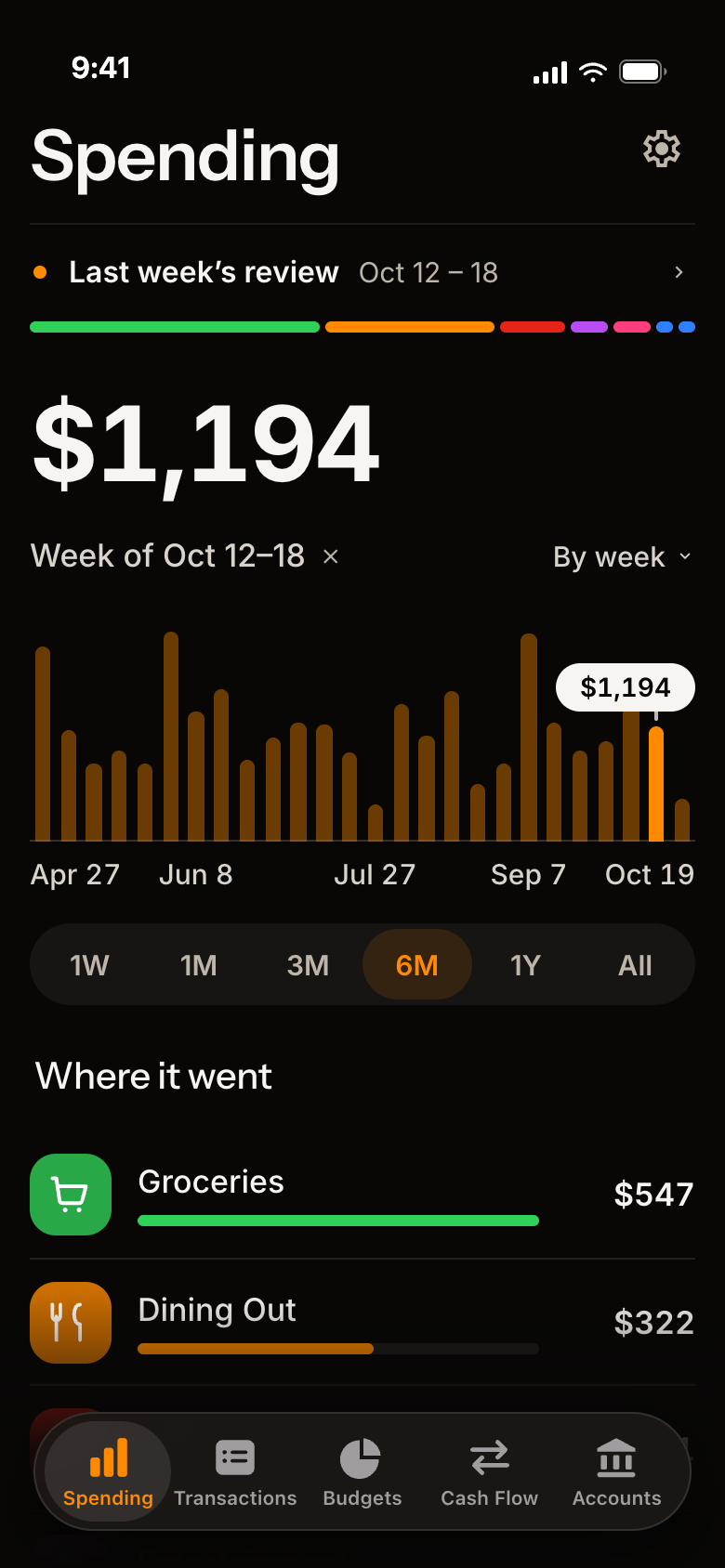
  1. Tap a bar to see just that week.
  2. Your biggest categories, in order.
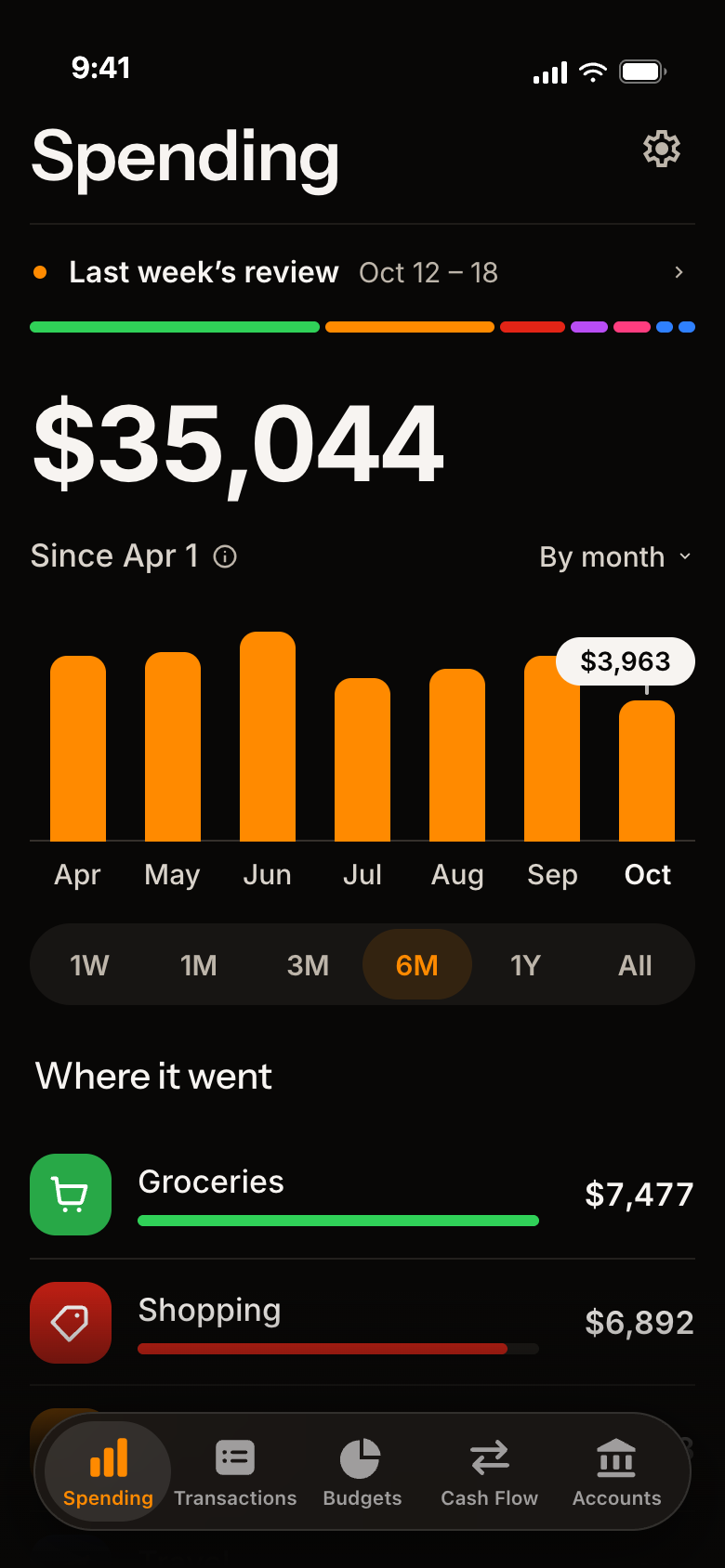
  3. See your spending by day, week or month.
Lava Money's Spending screen with sample numbers: the title Spending, a line for last week's review, Oct 12 to 18, with a strip of its categories in color, $1,194 for the week of Oct 12 to 18, a bar for each week from April to October with that week lit and $1,194 marked, a 'By week' menu, the range pills 1W to All with 6M chosen, and under them Where it went: Groceries $547 in green and Dining Out $322 in orange.
The same screen by month: $35,044 since Apr 1, a 'By month' menu at the right, a bar for each month from Apr to Oct with $3,963 marked on October, the range pills with 6M chosen, and under them Where it went: Groceries $7,477 in green and Shopping $6,892 in red.
A category

Over budget? See why.

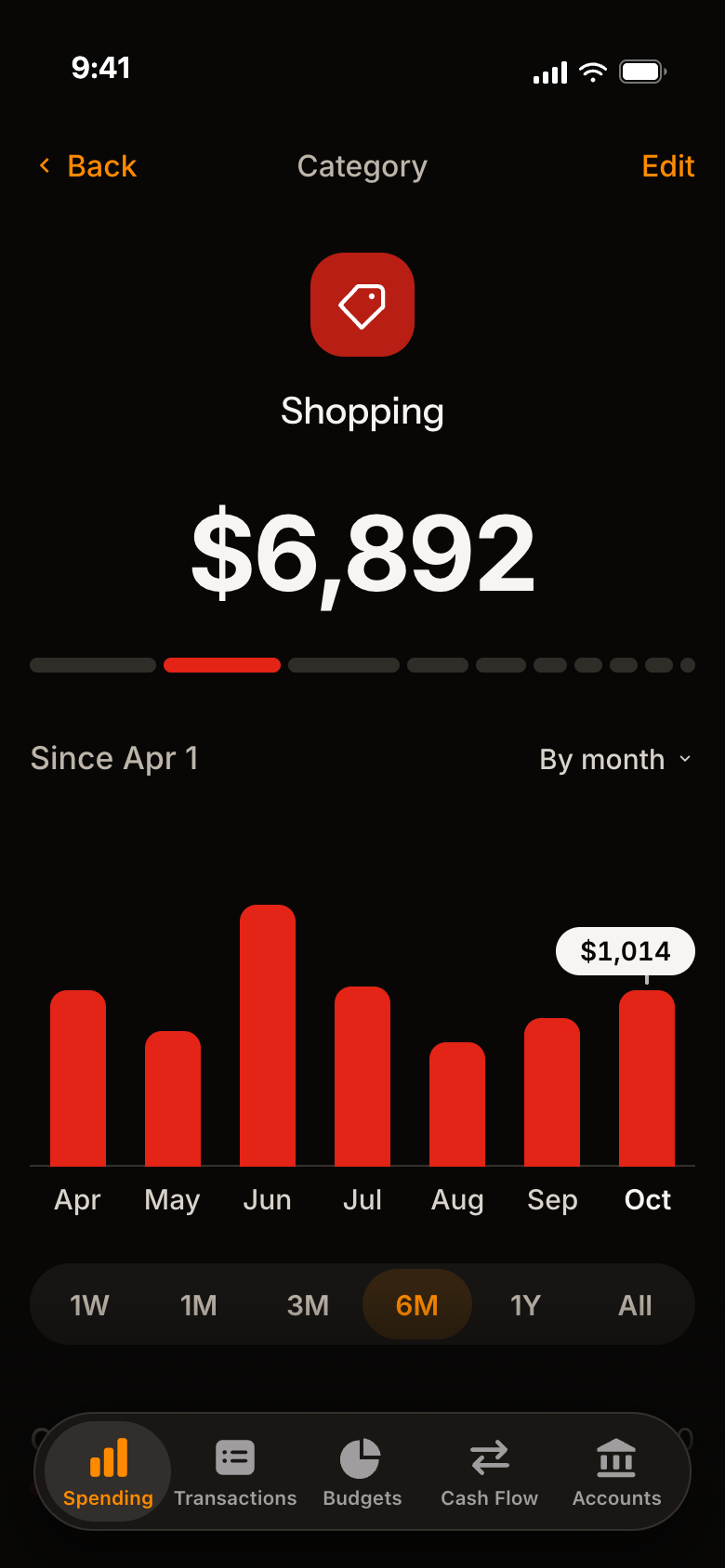
Tap any category for the full story.

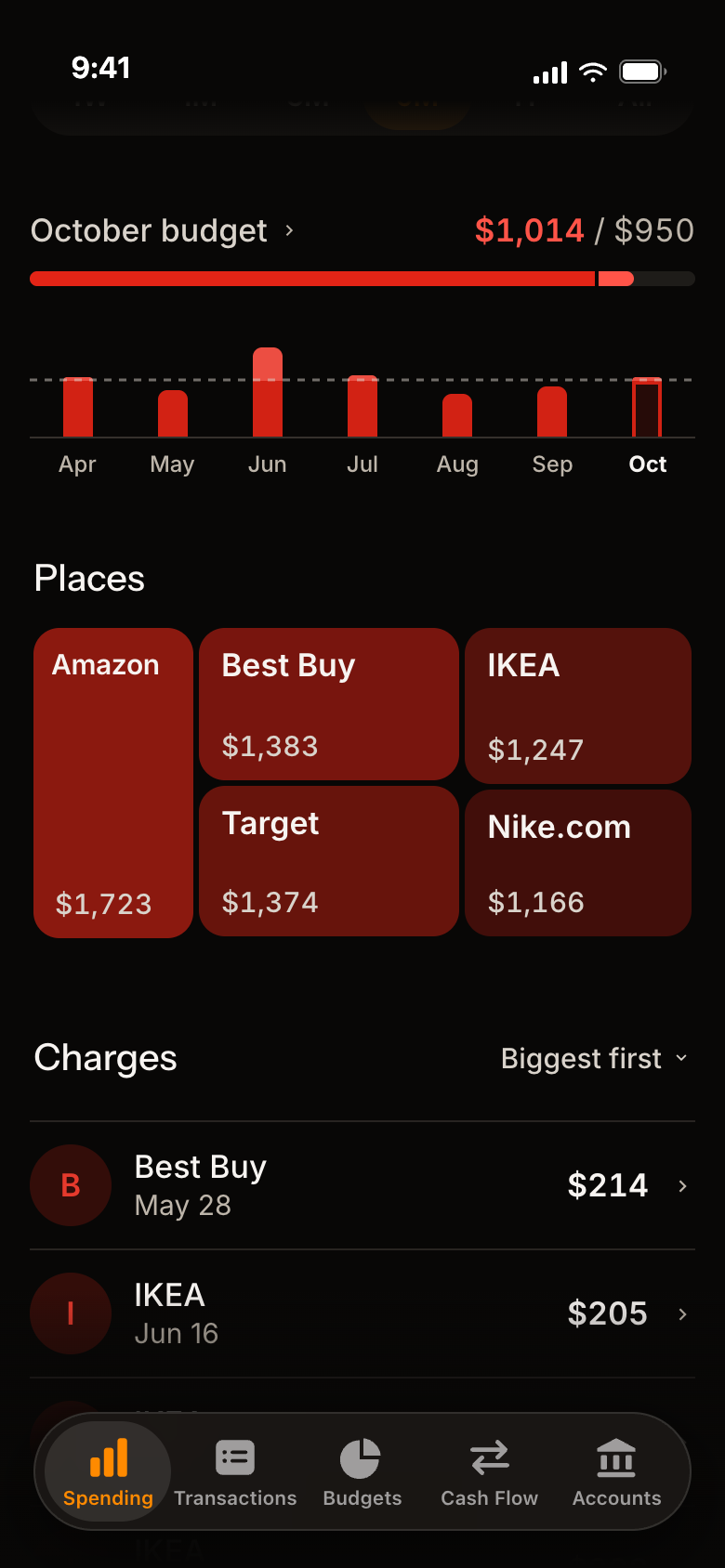
  1. The colored bar shows its share of your spending.
  2. Spent so far against your budget, with six months to compare.
  3. Places and charges show where it went.
A Shopping category page with sample numbers: Back and Edit buttons, a red tile, Shopping, $6,892 since Apr 1, a colored bar showing its share of all spending, a 'By month' menu, a bar for each month from Apr to Oct with $1,014 marked on October, the range pills with 6M chosen, and the October budget just below.
Lower on the Shopping page: October budget $1,014 / $950 in red with a bar, a bar for each month from Apr to Oct against a dashed budget line, Places as five boxes (Amazon $1,723, Best Buy $1,383, Target $1,374, IKEA $1,247 and Nike.com $1,166), and Charges, biggest first, starting with Best Buy $214 and IKEA $205.
Budgets

A budget without the guesswork.

Start from what you really spend.

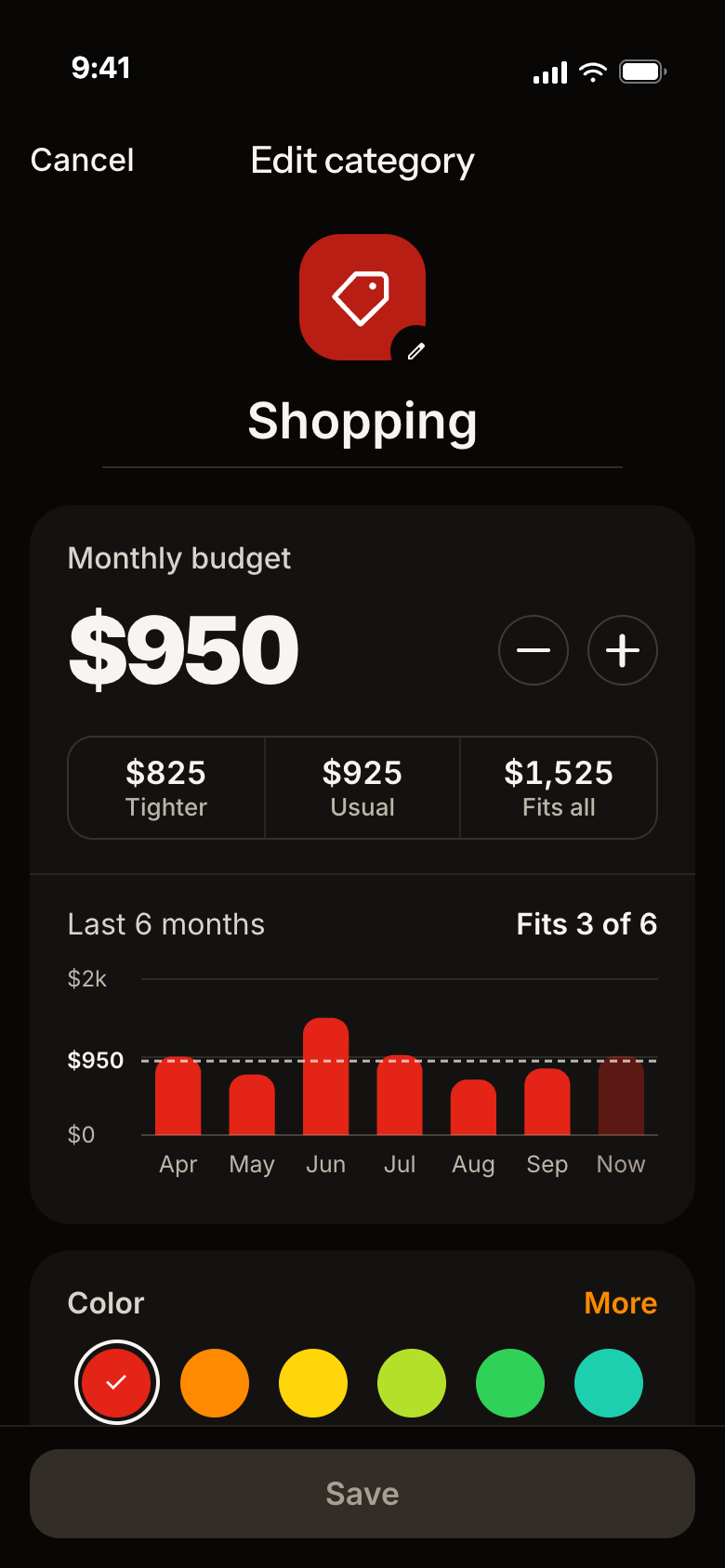
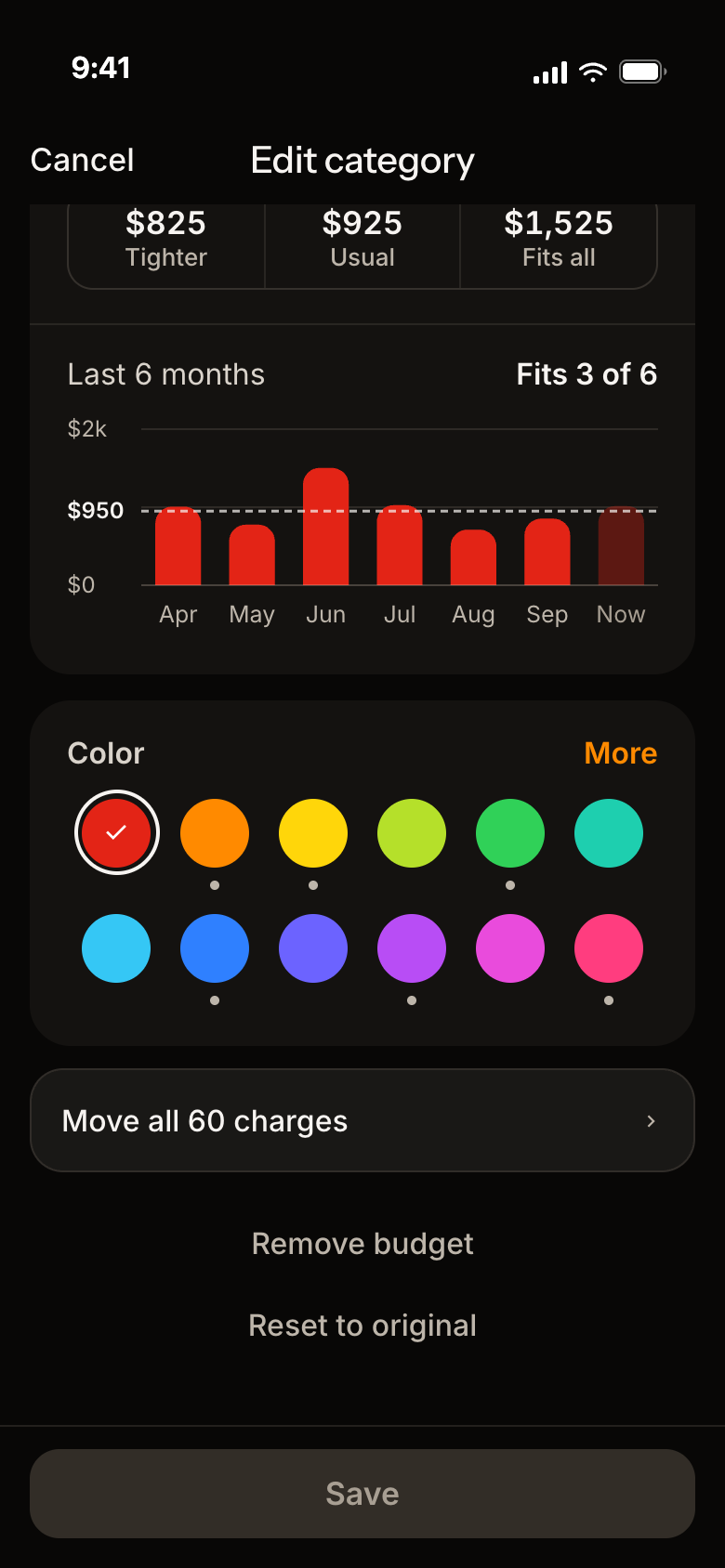
  1. Pick Tighter, Usual or Fits all. Or set your own.
  2. See how many of the last six months it would have fit.
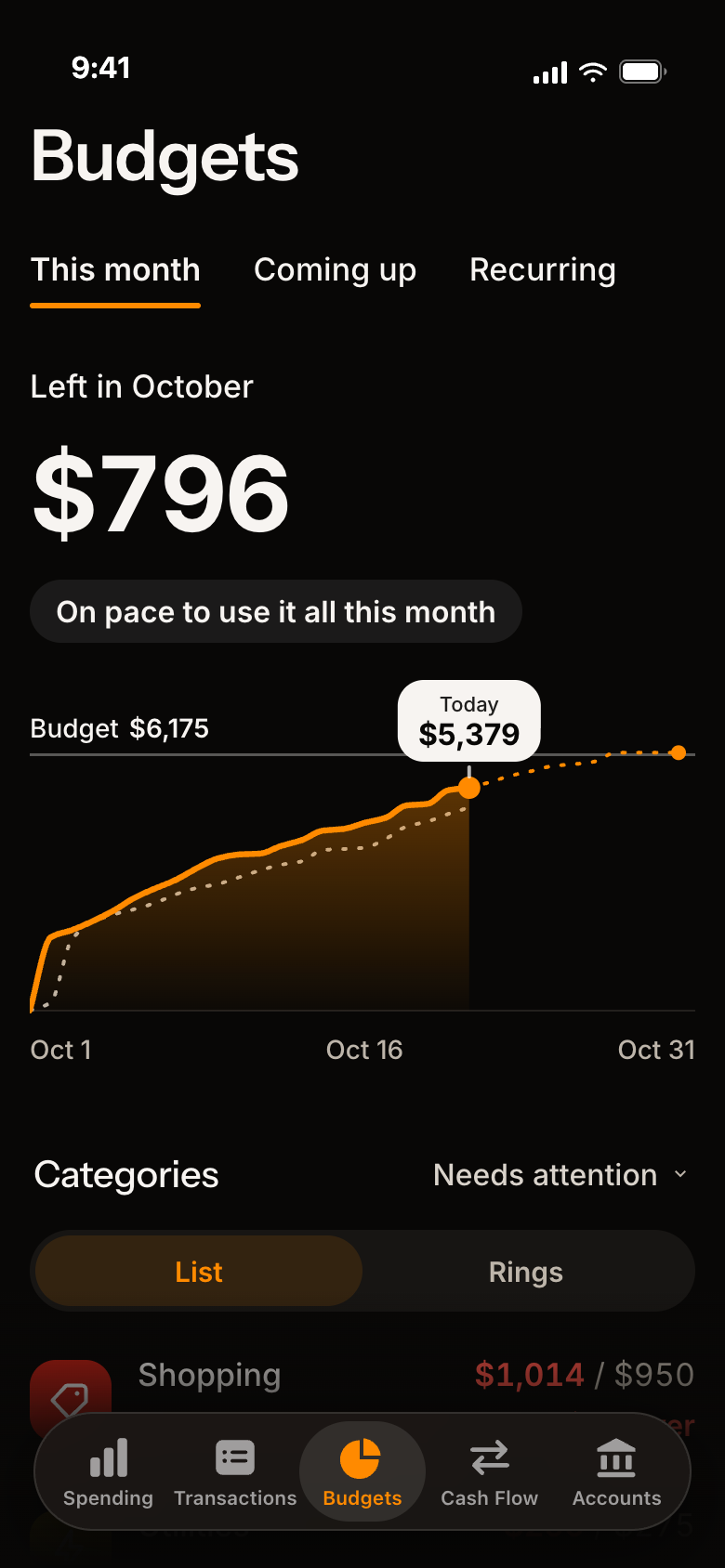
  3. Check your pace any day of the month.
Edit category for Shopping: its red tile with a pencil and its name, the monthly budget $950 with minus and plus buttons, three choices, Tighter $825, Usual $925 and Fits all $1,525, the line 'Last 6 months, Fits 3 of 6', six months of bars against a dashed $950 line on a dollar scale, and the top of the Color card.
The budgets page with sample numbers: the tabs This month, Coming up and Recurring, 'Left in October $796', a pill that says On pace to use it all this month, a line chart of the month so far, today's $5,379 marked, a dotted line for the usual pace up to the budget of $6,175, and under it Categories as a list or rings, starting with Shopping $1,014 / $950.
Transactions

Find any charge. Fix it fast.

Everything you've spent, in one list.

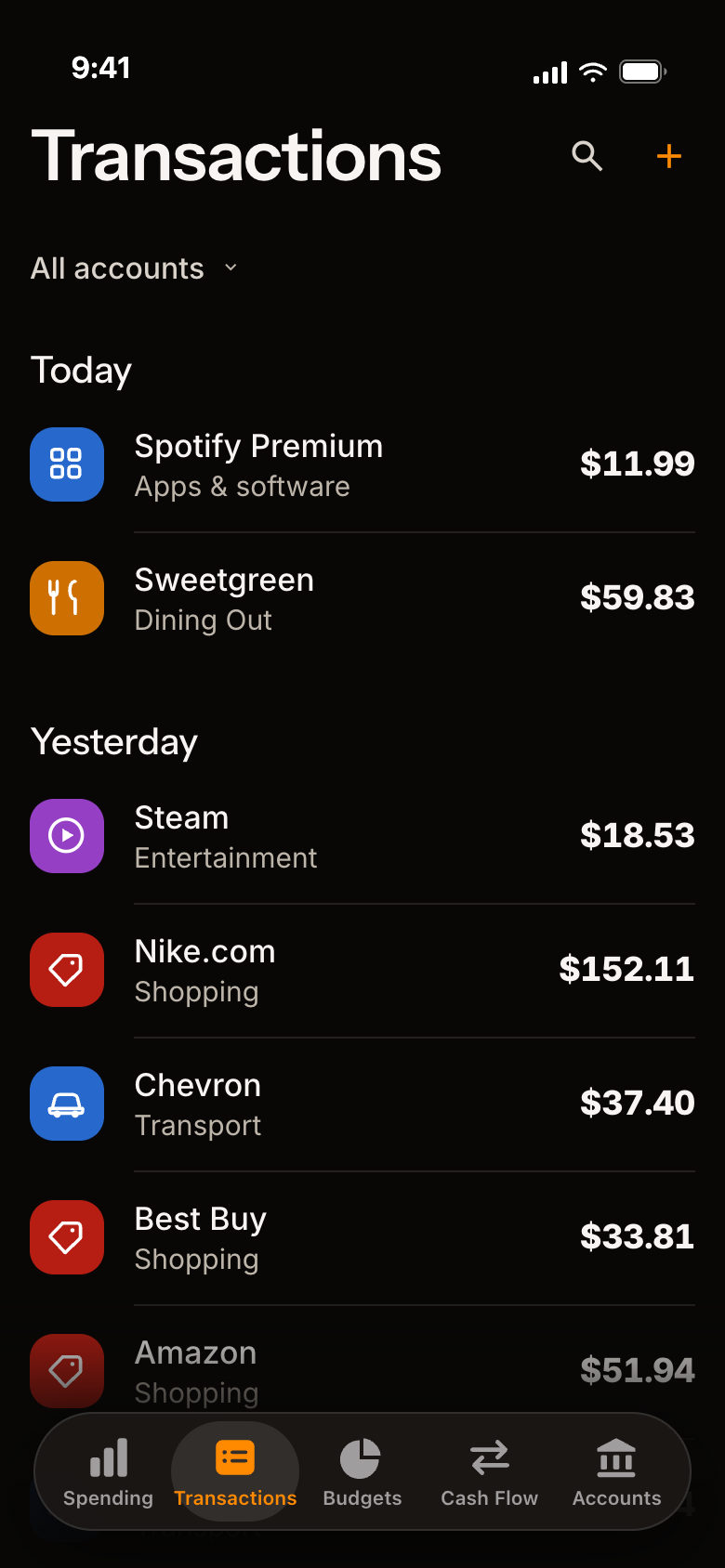
  1. Search for any charge.
  2. Change a name, category or date in a few taps.
  3. Leave a charge out of your totals.
The Transactions screen with sample numbers: a search icon and a plus, All accounts, and charges by day: Today, Spotify Premium $11.99 and Sweetgreen $59.83, then Yesterday, Steam $18.53, Nike.com $152.11, Chevron $37.40 and more.
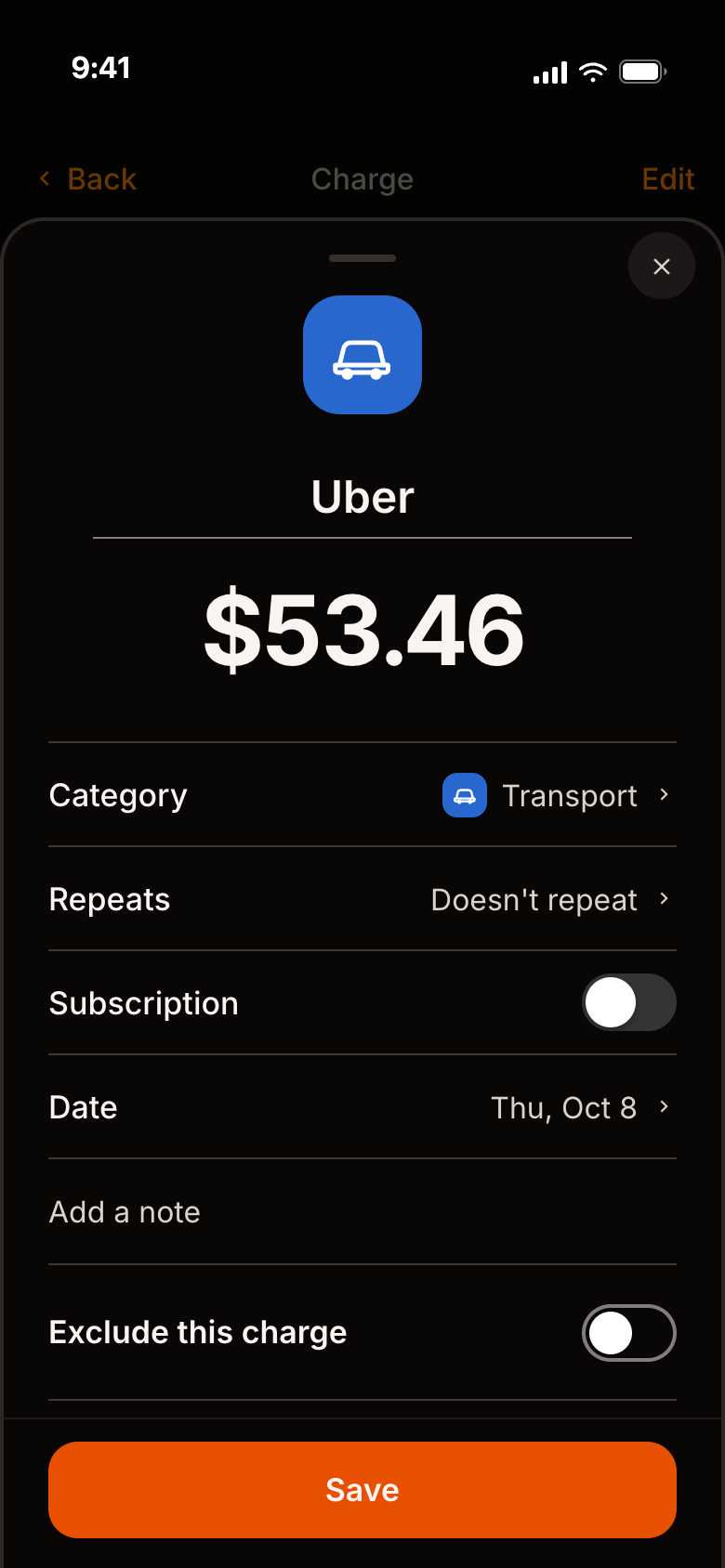
The Edit transaction sheet over the Uber charge: the name Uber, $53.46, rows for Category (Transport), Repeats, a Subscription switch, Date (Thu, Oct 8) and a note, a switch for Exclude this charge, and a Save button.
Cash Flow

Did you save?

One line tells you.

  1. See what you saved, right at the top.
  2. One bar shows how much went to rent, spending and savings.
  3. Tap any piece for its own chart and list.
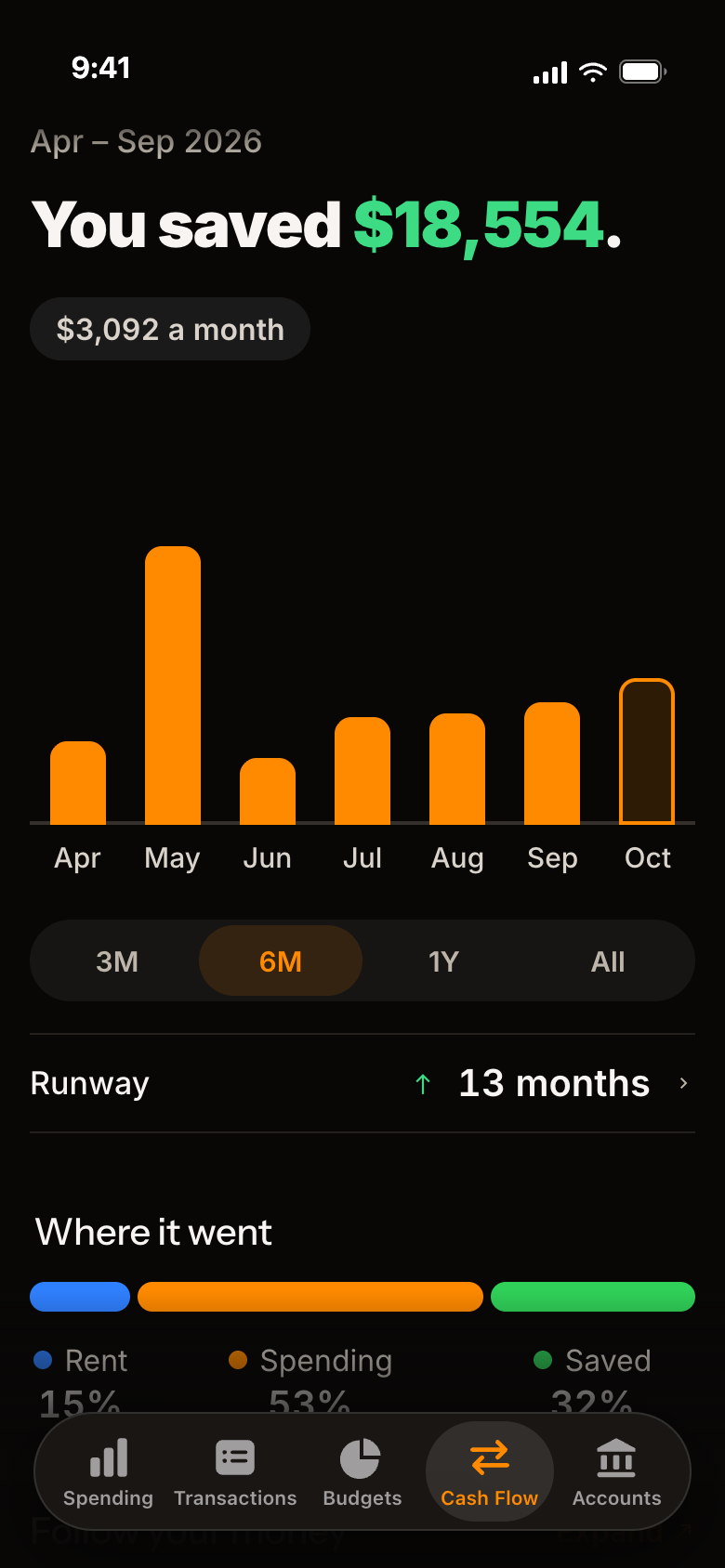
The Cash Flow page with sample numbers: Apr – Sep 2026, the line 'You saved $18,554.', a pill that says $3,092 a month, a bar for each month from April to October, the range pills 3M, 6M, 1Y and All with 6M chosen, Runway 13 months, and Where it went as one strip, with Rent 15%, Spending 53% and Saved 32% under it, each under its own piece.
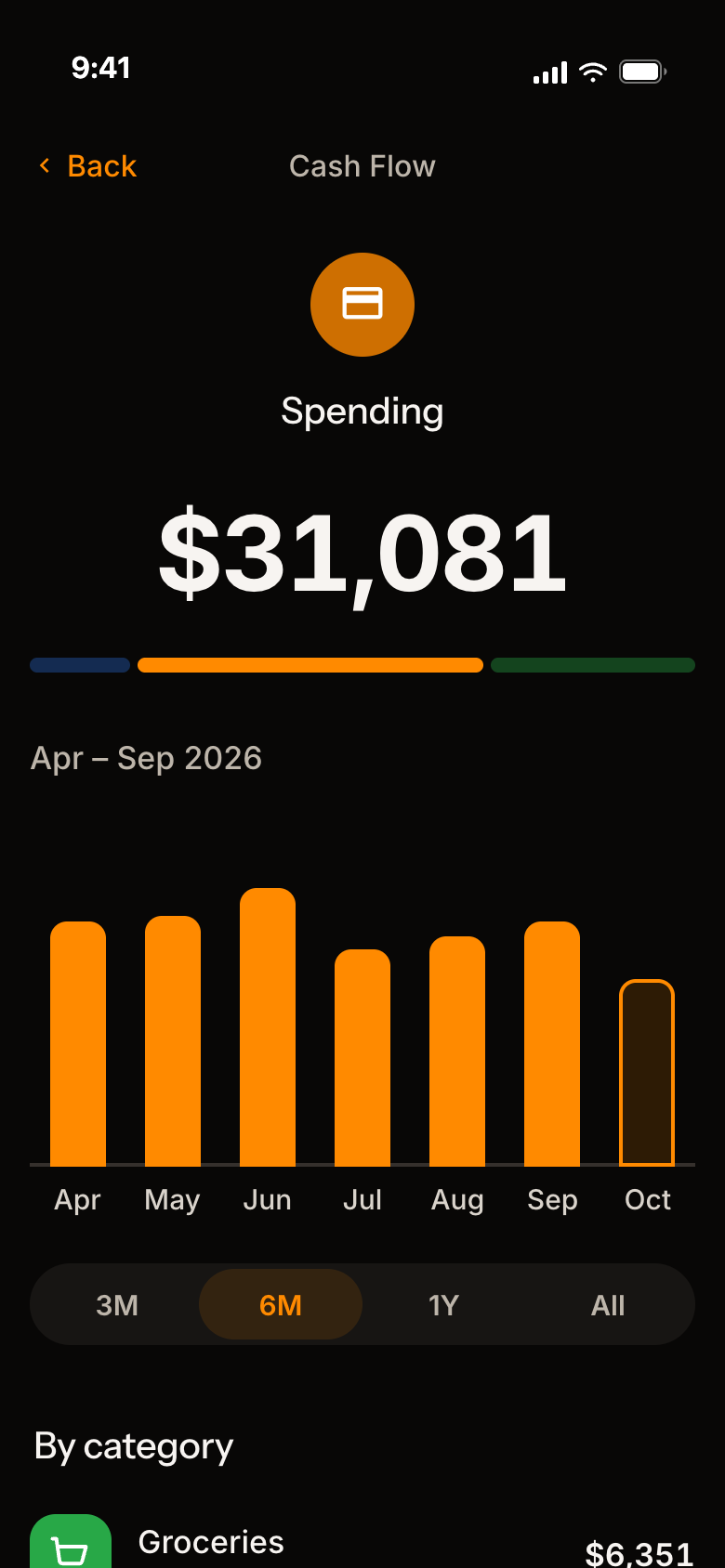
The Spending page of Cash Flow, opened from the strip, with sample numbers: $31,081 for Apr – Sep 2026 under the strip with the Spending piece lit, a bar for each month from April to October, the range pills with 6M chosen, and By category, starting with Groceries $6,351.
Coming up

Nothing sneaks up on you.

Bills and subscriptions, on a calendar.

  1. A circle on every day something is due.
  2. See what all your subscriptions cost a year.
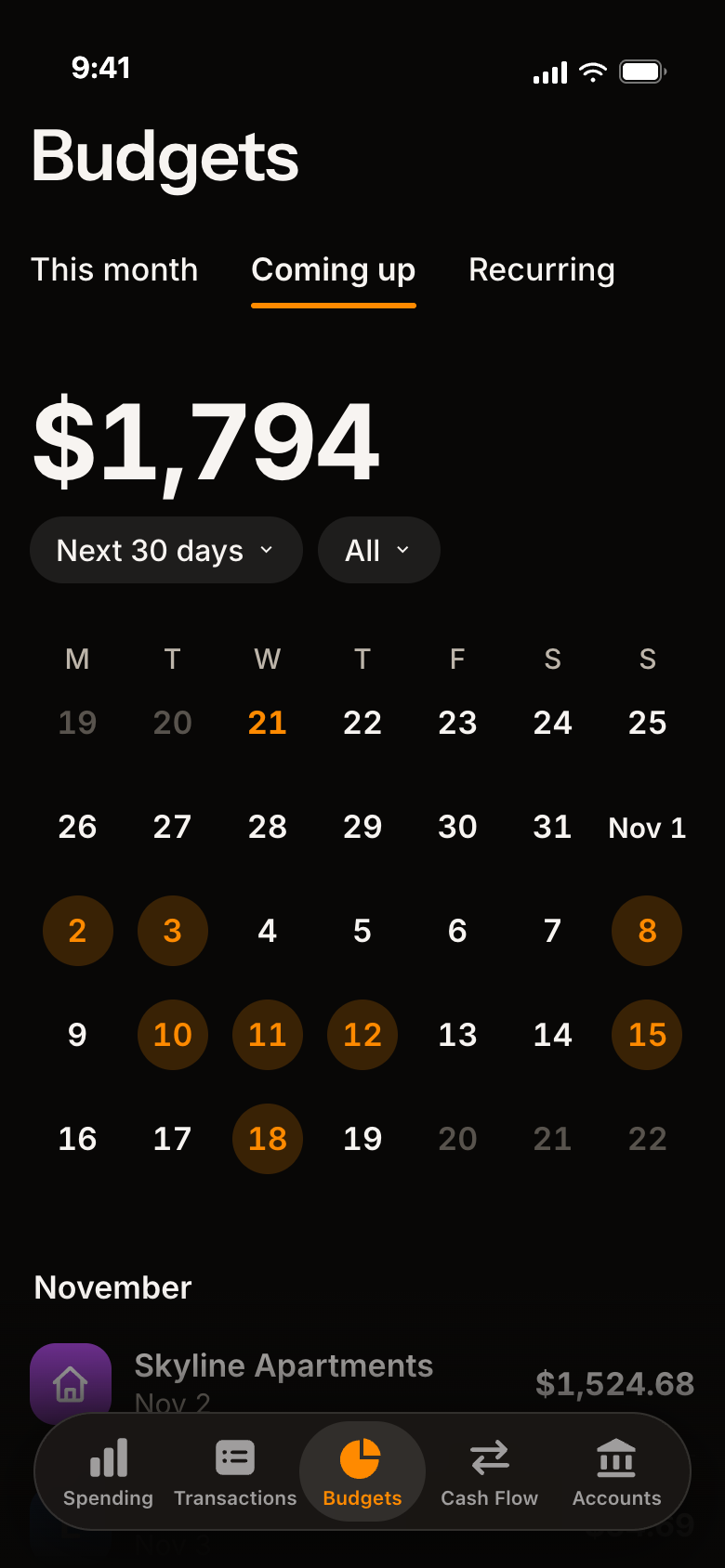
The Coming up tab with sample numbers: $1,794 due in the next 30 days, two menus, Next 30 days and All, a calendar of the weeks ahead with a soft orange circle on each day something is due, and November below it, starting with Skyline Apartments $1,524.68.
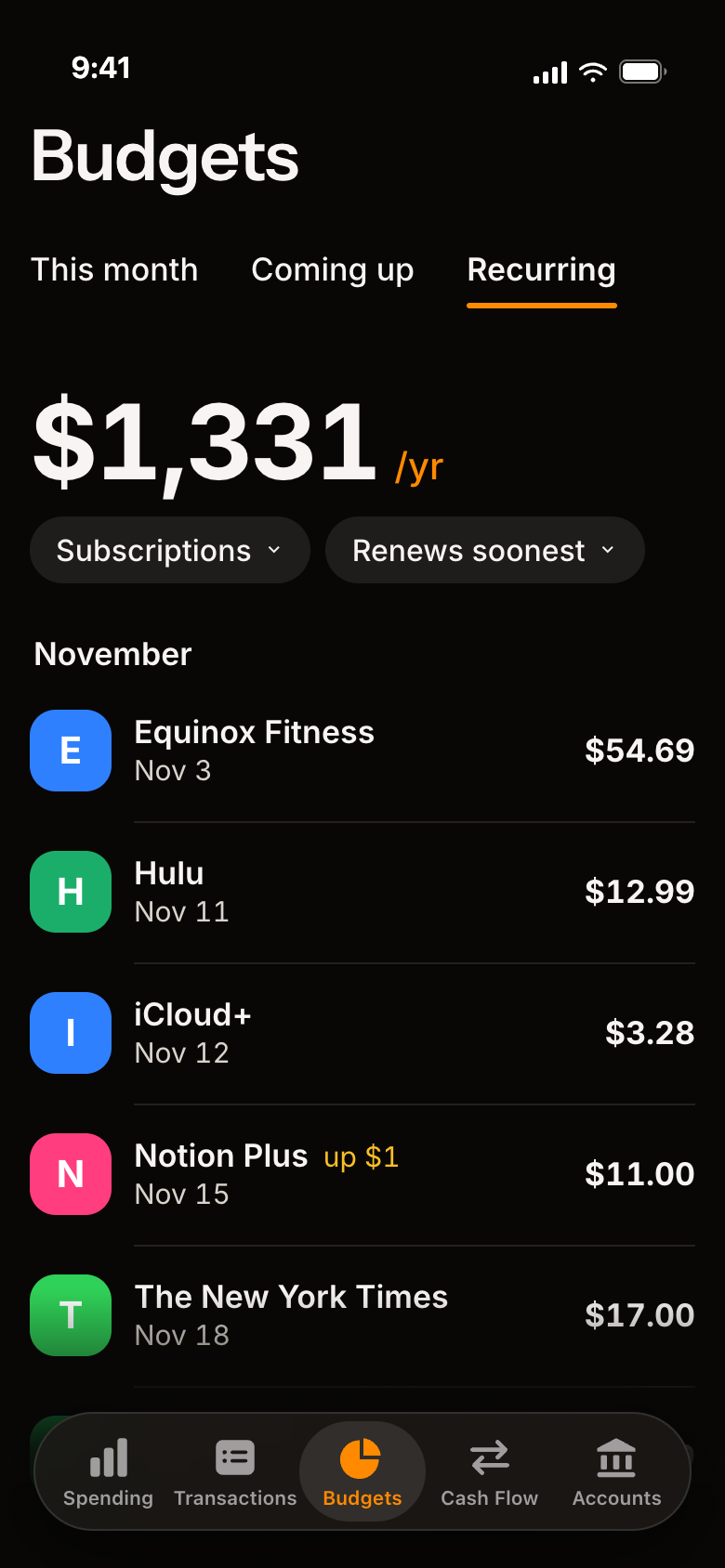
The Recurring tab with sample numbers: $1,331 a year for subscriptions, two menus, Subscriptions and Renews soonest, and the subscriptions in the order they renew: Equinox Fitness $54.69 on Nov 3, Hulu $12.99 on Nov 11, iCloud+ $3.28 on Nov 12, Notion Plus $11.00 on Nov 15, up $1, and The New York Times $17.00 on Nov 18.
Weekly review

Your week, in a few pages.

Share it as a picture, with or without the amounts.

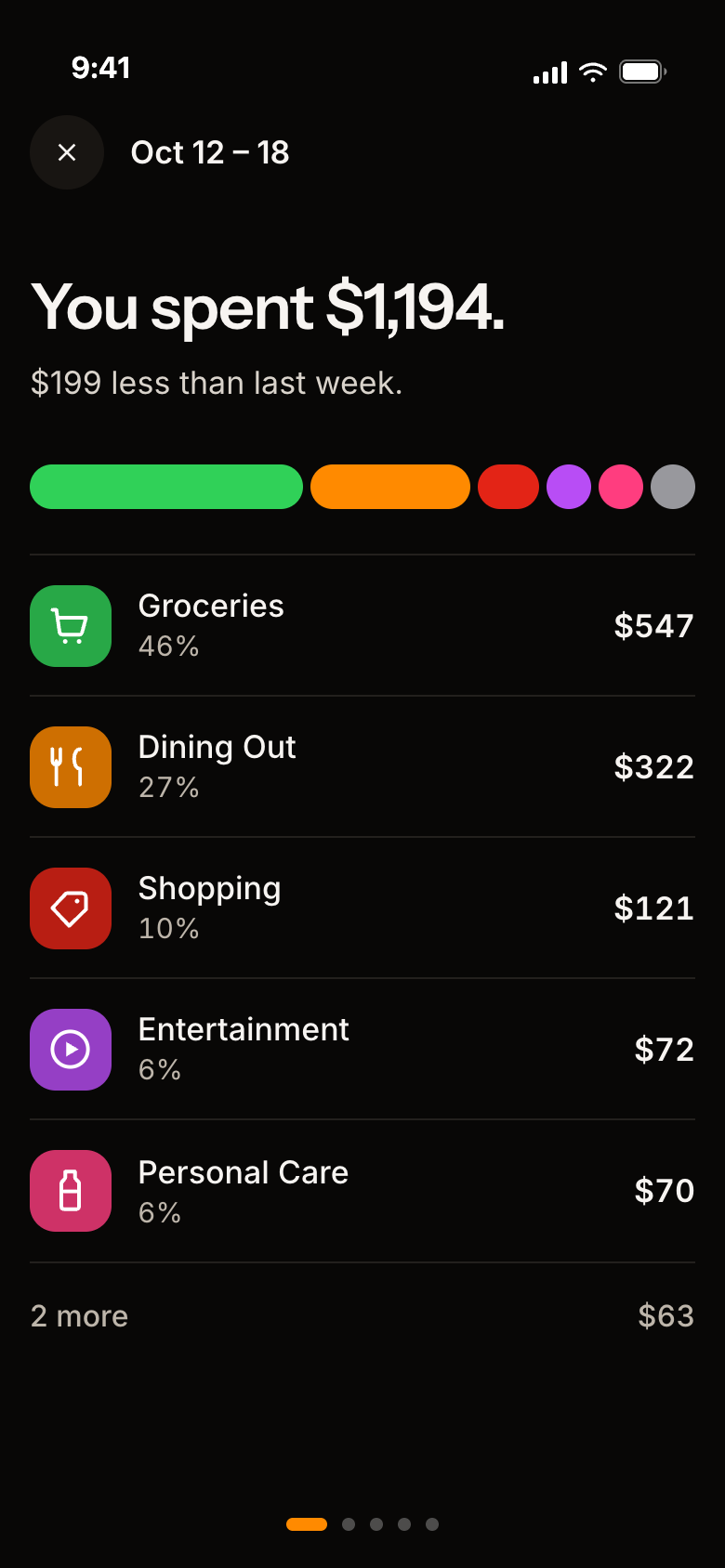
  1. See where your week went, in color.
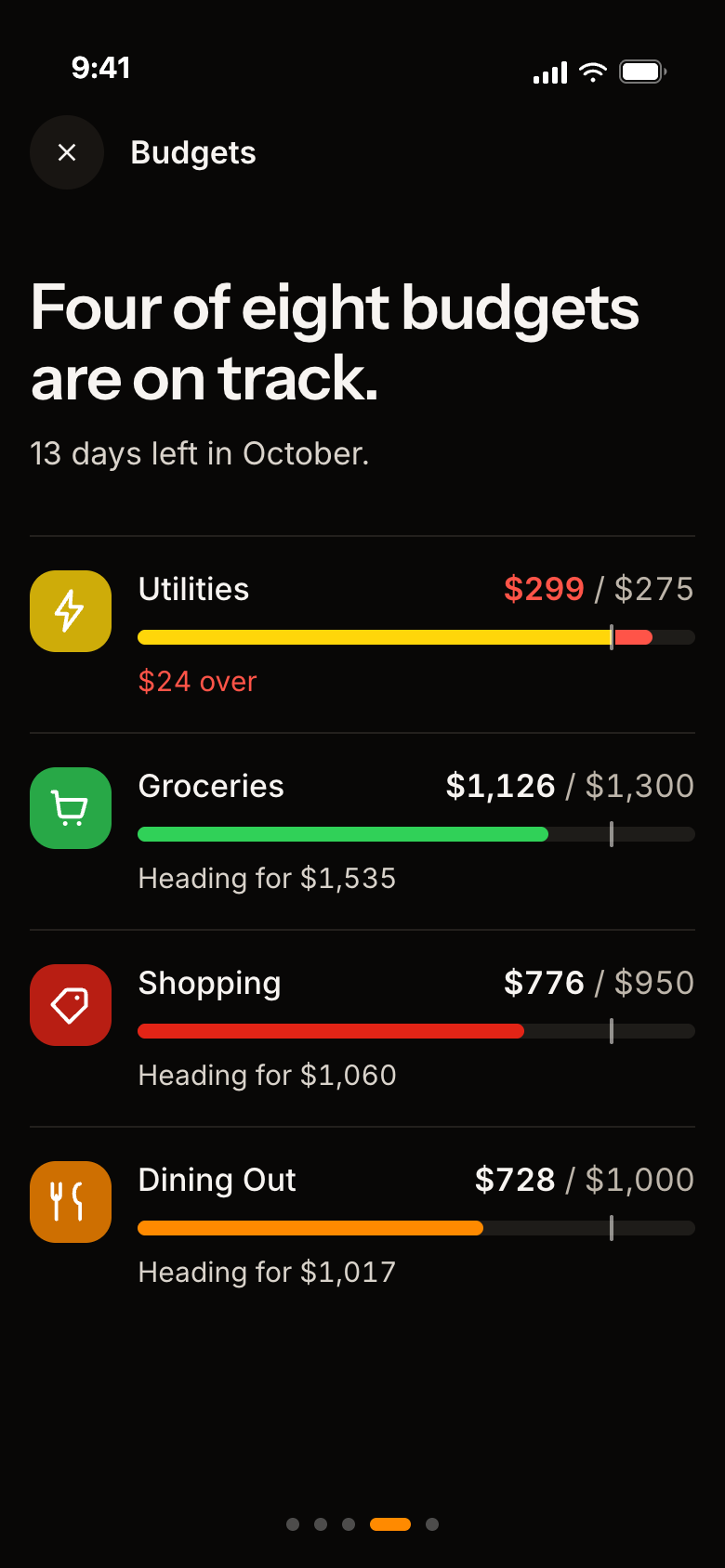
  2. See which budgets are on track.
The first page of the weekly review with sample numbers: 'You spent $1,194.', $199 less than last week, a colored strip of where the week went, and the five biggest categories with their share and amount: Groceries $547, Dining Out $322, Shopping $121, Entertainment $72 and Personal Care $70.
The Budgets page of the review with sample numbers: 'Four of eight budgets are on track.', 13 days left in October, then Utilities $299 of $275 in red with $24 over, Groceries $1,126 of $1,300, Shopping $776 of $950 and Dining Out $728 of $1,000, each with where it is heading.
Net worth

All your accounts, one number.

Cash, investments and debt, together.

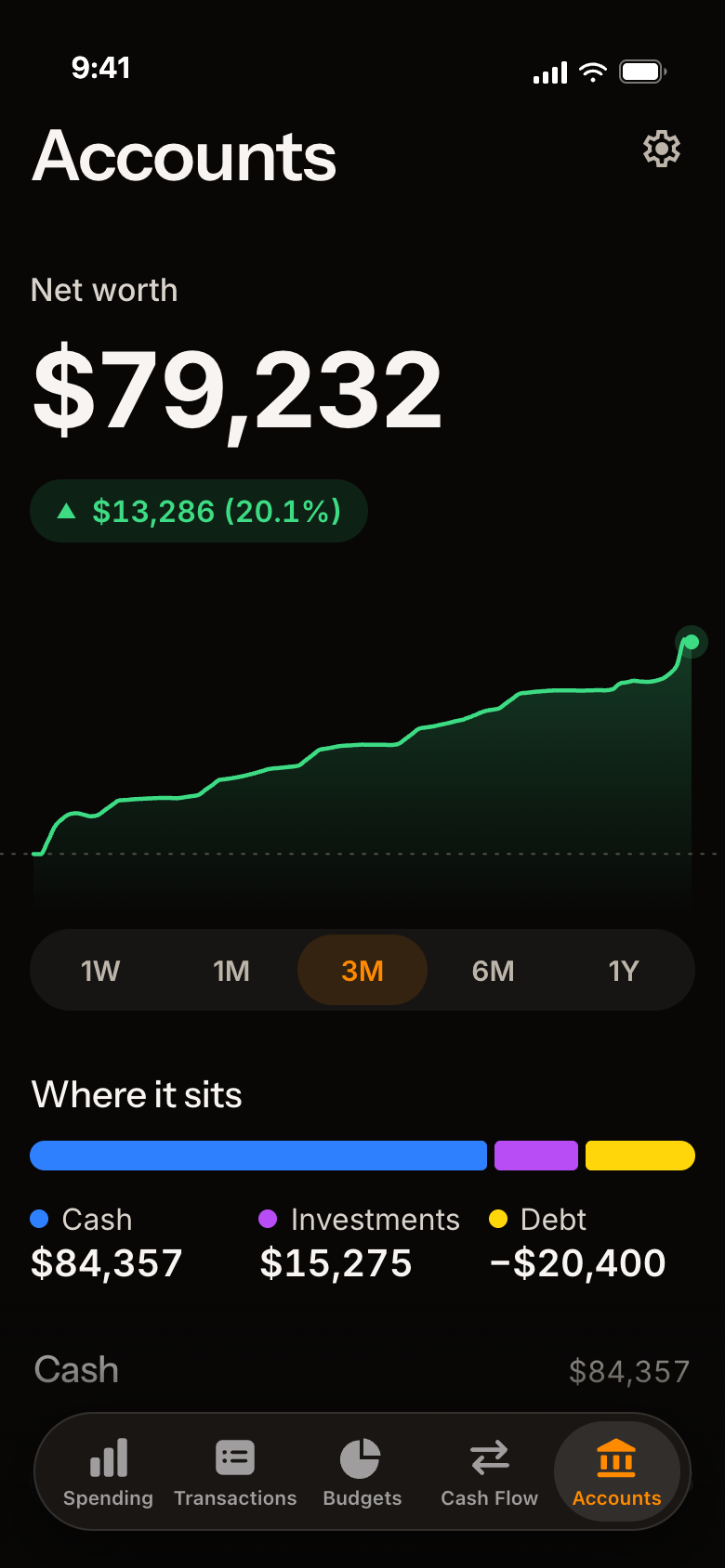
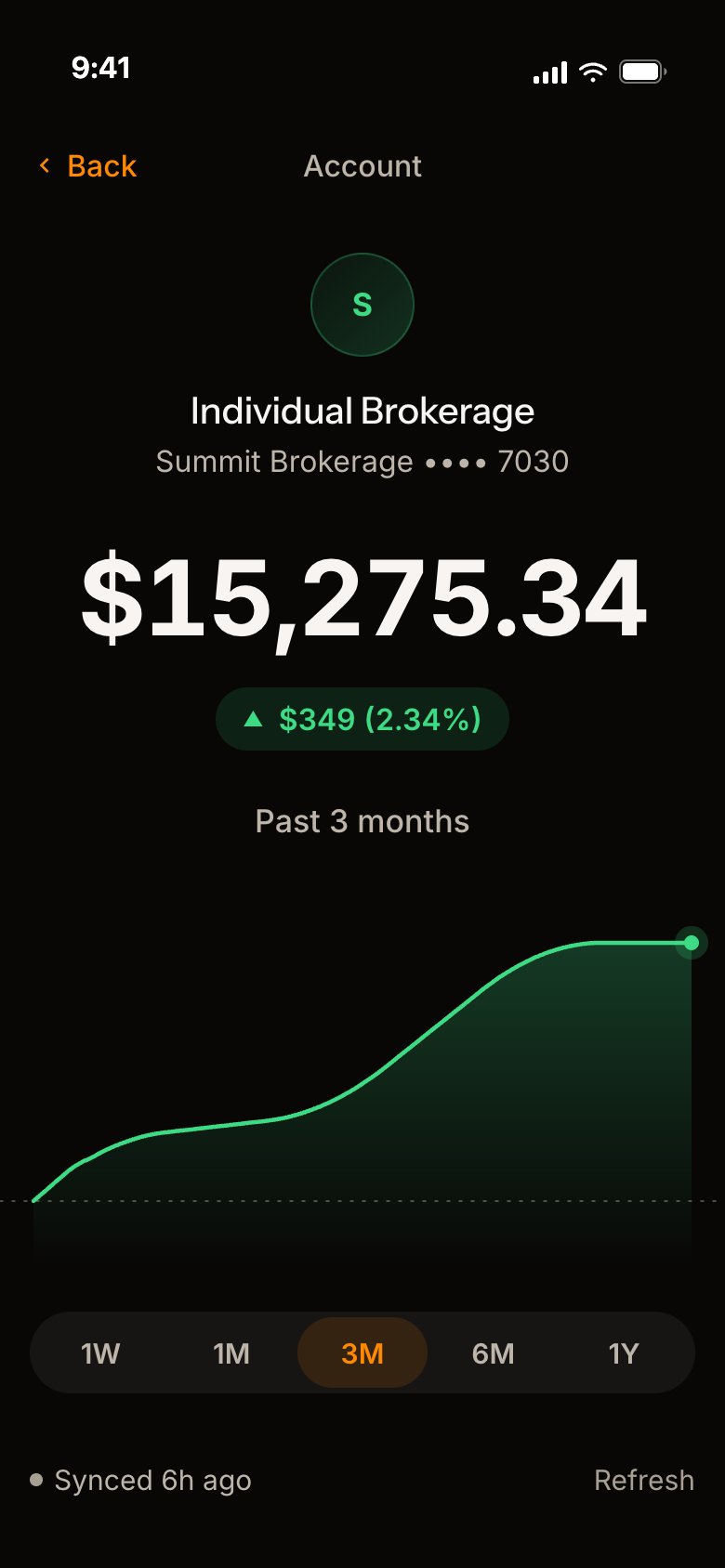
  1. Your net worth, in one number.
  2. See how it splits: cash, investments, debt.
  3. Tap an account to see its own chart.
The Accounts page with sample numbers: Net worth $79,232, a green pill with $13,286 (20.1%), a smooth green line chart of it, the range pills 1W to 1Y with 3M chosen, and under them where it sits as one strip: cash $84,357, investments $15,275 and debt -$20,400.
A brokerage account's page with sample numbers: Individual Brokerage, Summit Brokerage ending 7030, a balance of $15,275.34, up $349 (2.34%) over the past 3 months, a green line of its value that climbs, the range words 1W to 1Y with 3M chosen, and when it last synced.
Make it yours

Make it yours.

Your categories, your colors, your rules.

  1. Pick your own colors and icons for every category.
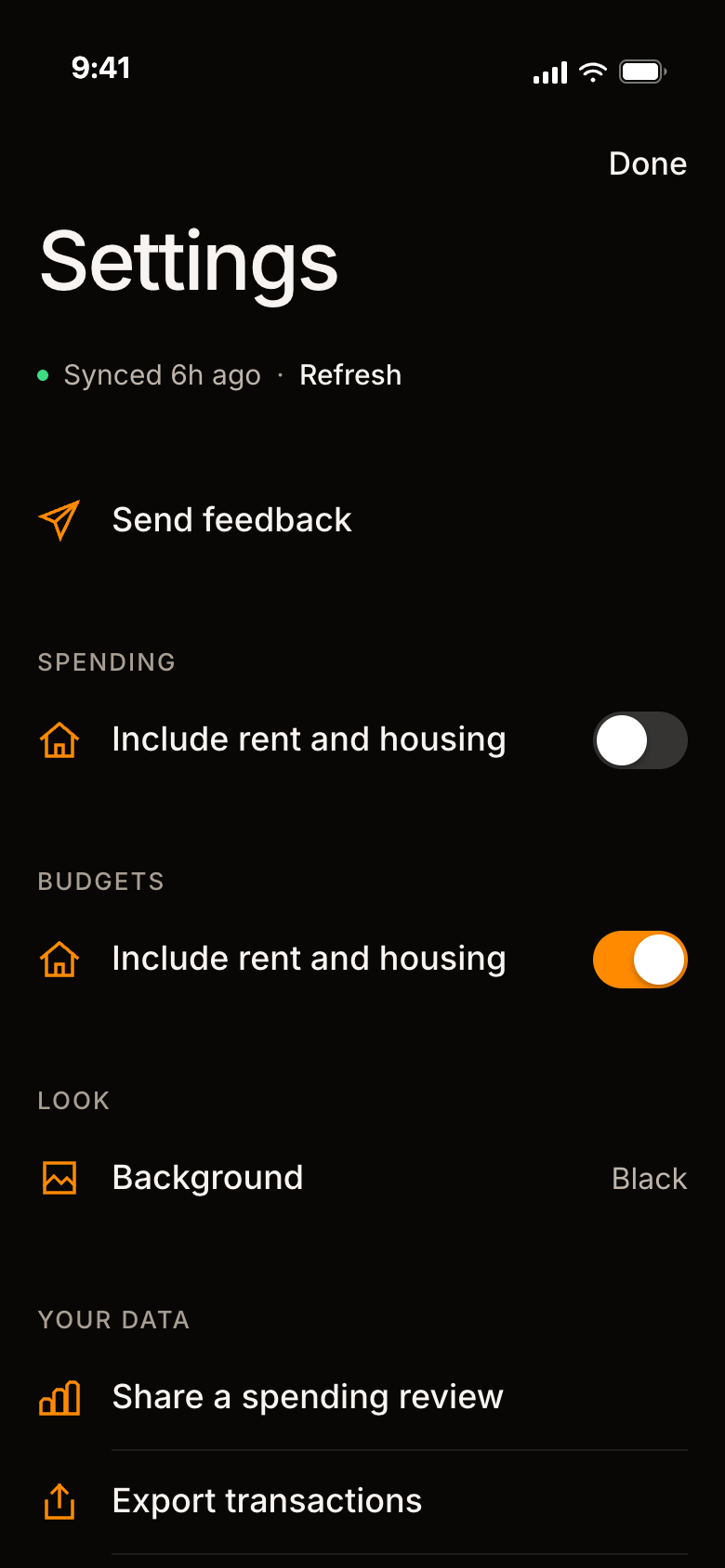
  2. Count rent and housing in your spending, or leave it out.
  3. Choose the background you like.
Edit category for Shopping, scrolled down: the Last 6 months chart, the Color card with a row of colors and red chosen, a row to move all 60 charges to another category, and the quiet lines Remove budget and Reset to original.
Settings: when the accounts last synced, Send feedback at the top, a switch for including rent and housing in Spending and one in Budgets, and the Background choice set to Black.
Your data

Your data, your call.

Bring it in. Take it out. Keep a copy.

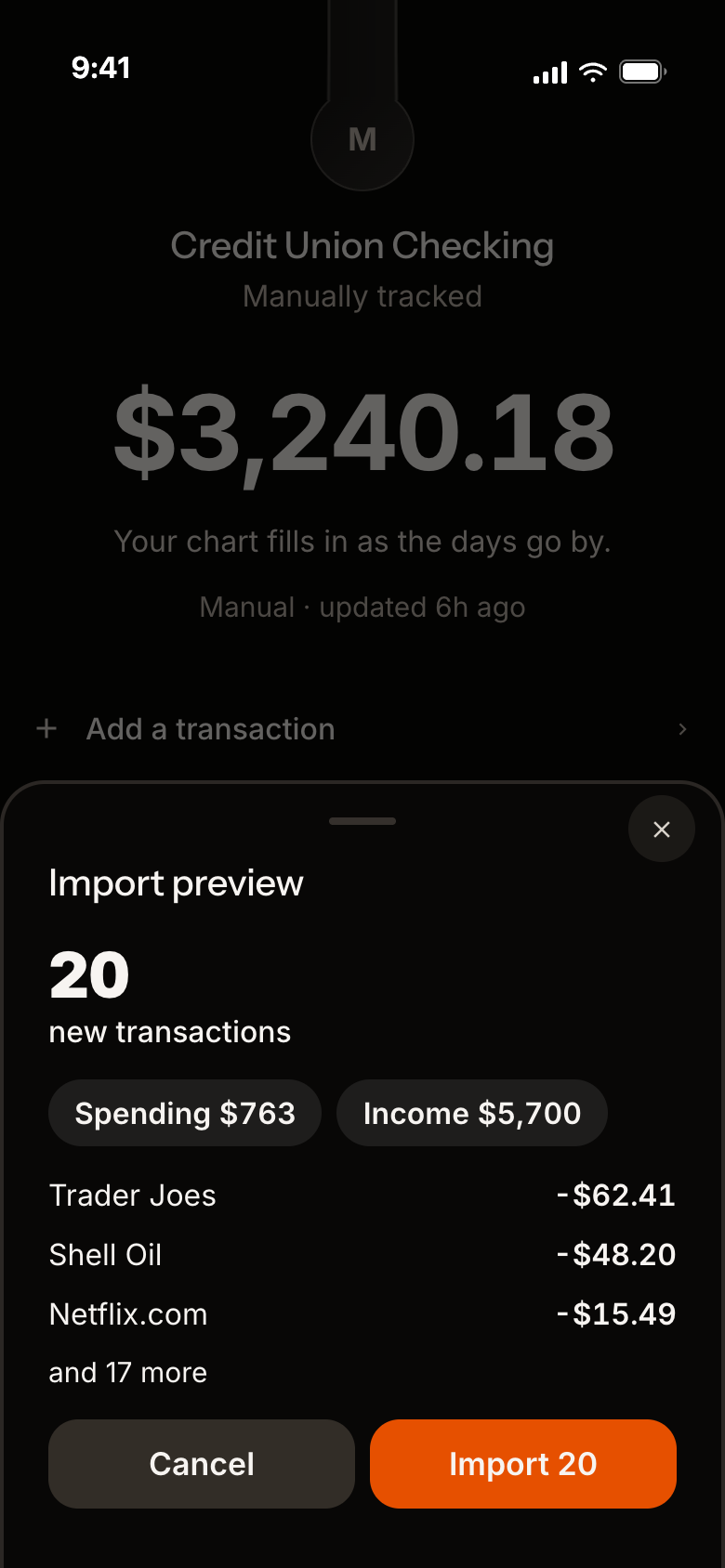
  1. Preview a CSV before anything gets imported.
  2. Export your transactions any time.
  3. Back up everything in one go.
The preview of a CSV from a bank before it is imported, with sample numbers: a big 20 over 'new transactions', pills for Spending $763 and Income $5,700, three rows (Trader Joes, Shell Oil and Netflix.com), 'and 17 more', and Cancel and Import 20 buttons.
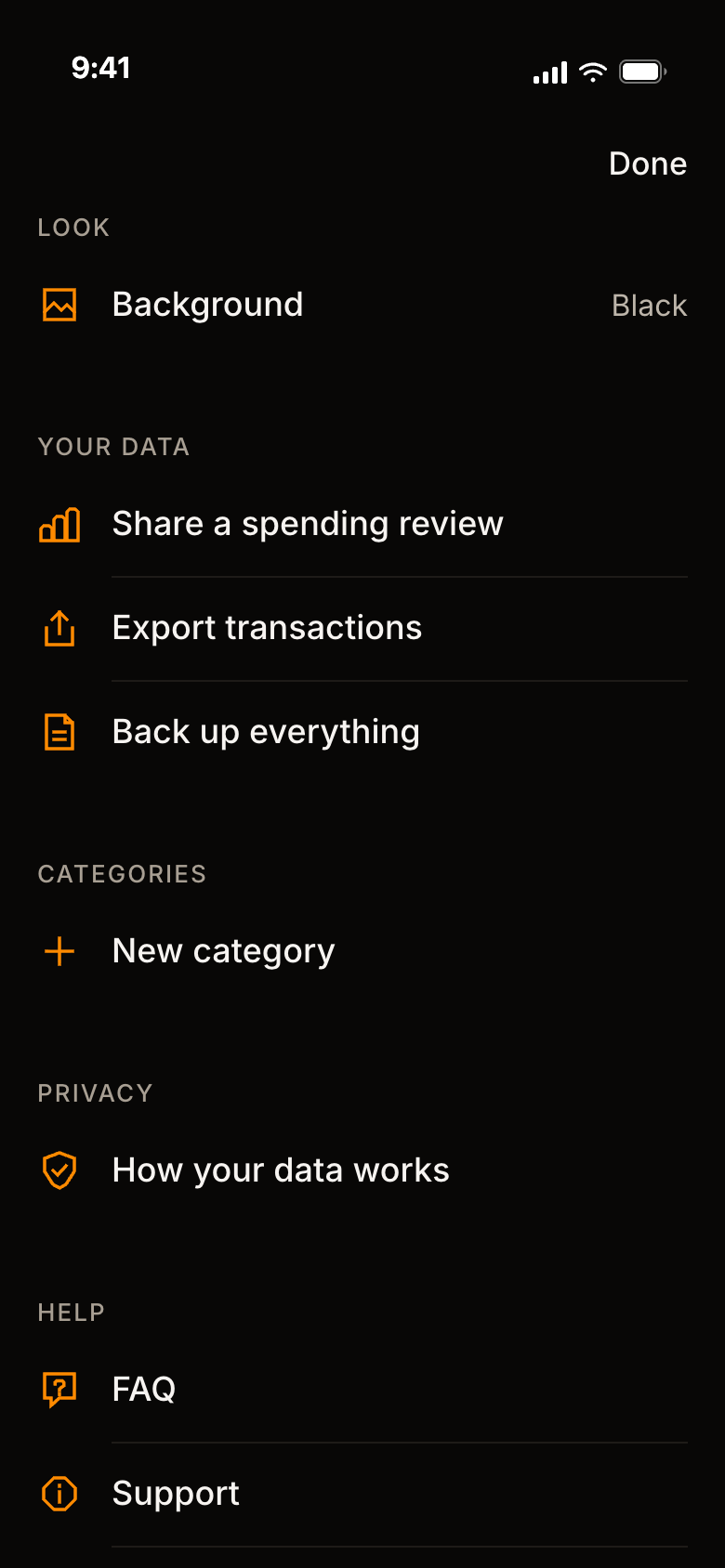
Settings, scrolled to Your data: Background set to Black, Share a spending review, Export transactions, Back up everything, then New category, How your data works, FAQ and Support.

Is Lava Money for you?

A good fit if

  • You tried a budgeting app and stopped.
  • You want to know where you stand with your money, without it becoming a second job.
  • You care about privacy, and want to see exactly where your data lives.
  • You keep a spreadsheet, and want its answers without the upkeep.

Not a fit if

  • Envelope or zero-based budgeting.
  • Moving money, paying bills, or advice.
  • Anything but an iPhone, or a bank outside the U.S.for now
  • One shared account for two people.

We never store your transactions.

Here is where each kind of data lives, so you can check it against the app.

On your phone
Accounts, balances, transactions, holdings, budgets and categories.
Passes through our server, not kept
Transactions, balances and holdings from Plaid, on their way to your phone.
Goes to Plaid
Your bank login. It never reaches us.
Kept on our server, per linked bank
An encrypted connection token, a random device ID with a hash of the phone's sign-in secret, the bank's name, the state of the connection, and when you agreed to link. You can remove all of it in Settings.
Goes to Sentry
Crash reports from release builds. They carry no accounts, transactions or balances.

There is no ad or analytics software in the app, and none on this website. The privacy policy has the full list.

Plain answers.

Not here? Ask us.

Do I need an account?

No. There is no Lava Money account to create. You can look around with sample data first.

Can Lava Money move my money?

No. It is a tracking and budgeting tool. It is not a bank and it does not move money.

Do you store my transactions?

No. They are kept on your iPhone. When you link a bank, our server passes them to your phone without keeping them.

What does your server keep?

For each linked bank: an encrypted connection token, a random device ID, the bank's name and the state of the connection. You can remove these in Settings. The privacy policy has the full list.

Who is Plaid?

Plaid is the service that connects to your bank. Your bank login goes to Plaid and never reaches us. You can see and revoke what you have shared at my.plaid.com.

What leaves my phone?

Requests to sync a linked bank, and crash reports sent to Sentry. Anything you export or share, such as a weekly review PDF, goes only where you send it.

Do you sell my data or show ads?

No. There are no ads in the app or on this website, and we do not sell personal data.

Can I use it without linking a bank?

Yes. Add accounts by hand, or import a CSV from your bank.

Can I get my data out?

Yes. In Settings, "Export transactions" makes a CSV file and "Back up everything" makes a complete copy you can keep. Both go only where you send them.

How is my usual worked out?

Lava Money takes the middle value of the same stretch in your earlier weeks, so one big week does not move it. Around that it draws a range meant to hold about 80% of your ordinary weeks. With fewer than four earlier weeks, it says it is still learning instead of giving a verdict. Rent and mortgage payments that come every month are left out of the total unless you include them.

Does it give financial advice?

No. It shows how your spending compares with your own usual.

How do I delete my data?

In Settings, "Remove banks from our server" revokes every linked bank and deletes what our server keeps. "Reset all data" clears everything on the phone. The support page has the steps.

Where can I get it?

Lava Money is for iPhone only, and it is coming to the App Store. You can join the beta for a TestFlight invite, and we will email you the day it is on the App Store.

Join the beta

iPhone · TestFlight, then the App Store

Lava Money is being tested on iPhone now and is coming to the App Store. Leave your email for a TestFlight invite, and a note the day it is in the store. We use it for that and nothing else.

One confirmation email now, and one with your invite.

Know where you stand, every week.

We never store your transactions.

iPhone · TestFlight, then the App Store
A second volcano drawn in contour lines, three rivers of lava running down it onto the plain.